Free
0 Stars
every 30 days
- 20 open tasks
- 5 new tasks per day
- 50 new tasks per 30 days
- 50 AI credits per 30 days
Free AI also uses a shared monthly budget and may temporarily be unavailable.
Your AI assistant. Inside Telegram.
Send a message, voice note or photo. AI turns it into tasks, handles the details and prepares changes to your plans — right in Telegram.
Open our bot and tap Start in Telegram. The free plan has usage limits.
Bring your people along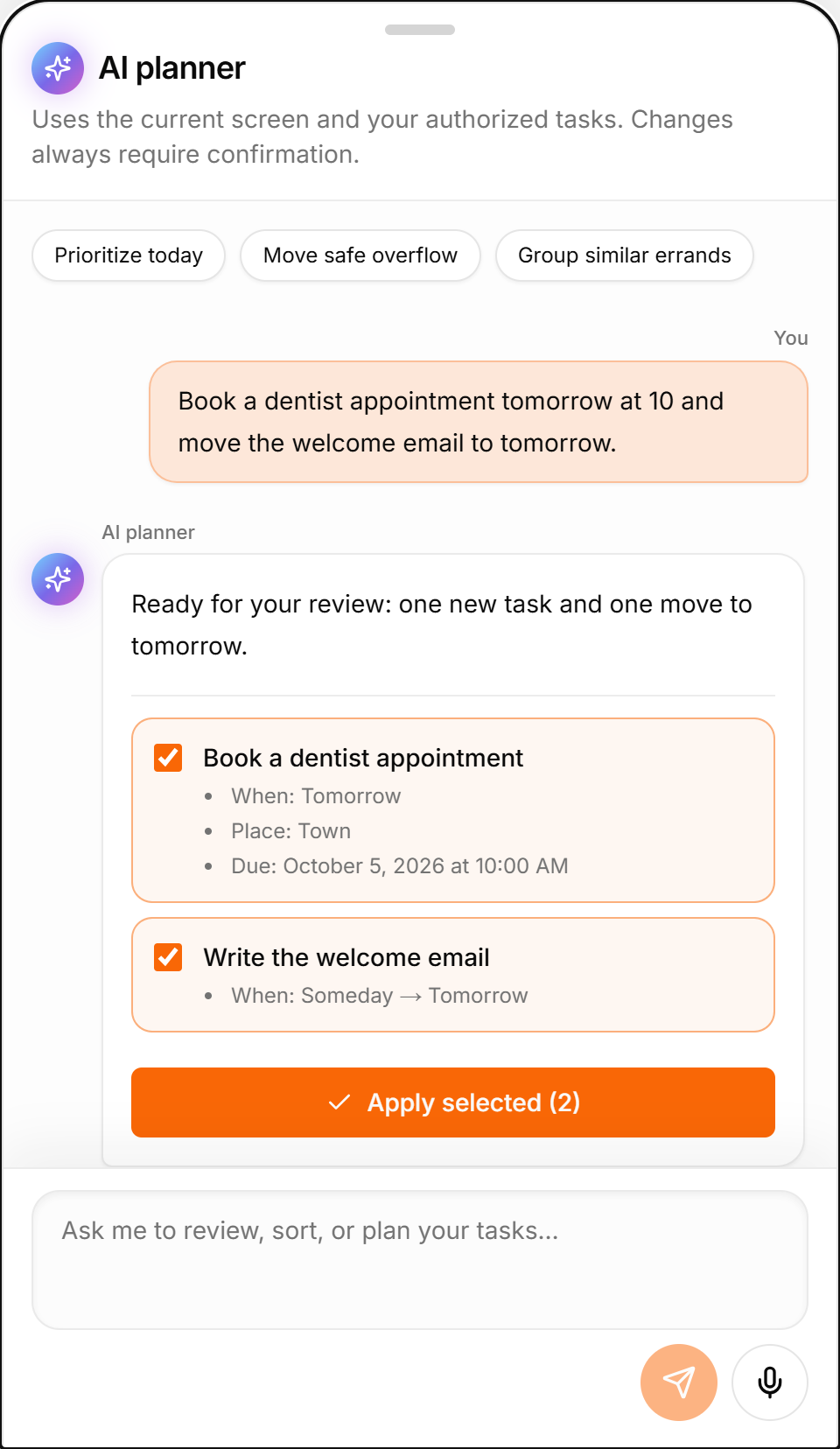
Send or forward a message. AI writes the title and description and picks out dates and reminders for you.
Say what needs doing. AI turns your voice note into an editable task draft.
Send a photo or screenshot to the bot. AI extracts the task details for you.
Ask AI to create, update or complete tasks, change dates or move work to another day. Review and apply its plan.
Get reminders in Telegram. Smart Deadlines automatically bring eligible tasks into focus as due dates approach.
The group owner enables capture. AI analyzes the captured discussion only when you run /analyze, then proposes tasks for you to confirm.
01 / Your people
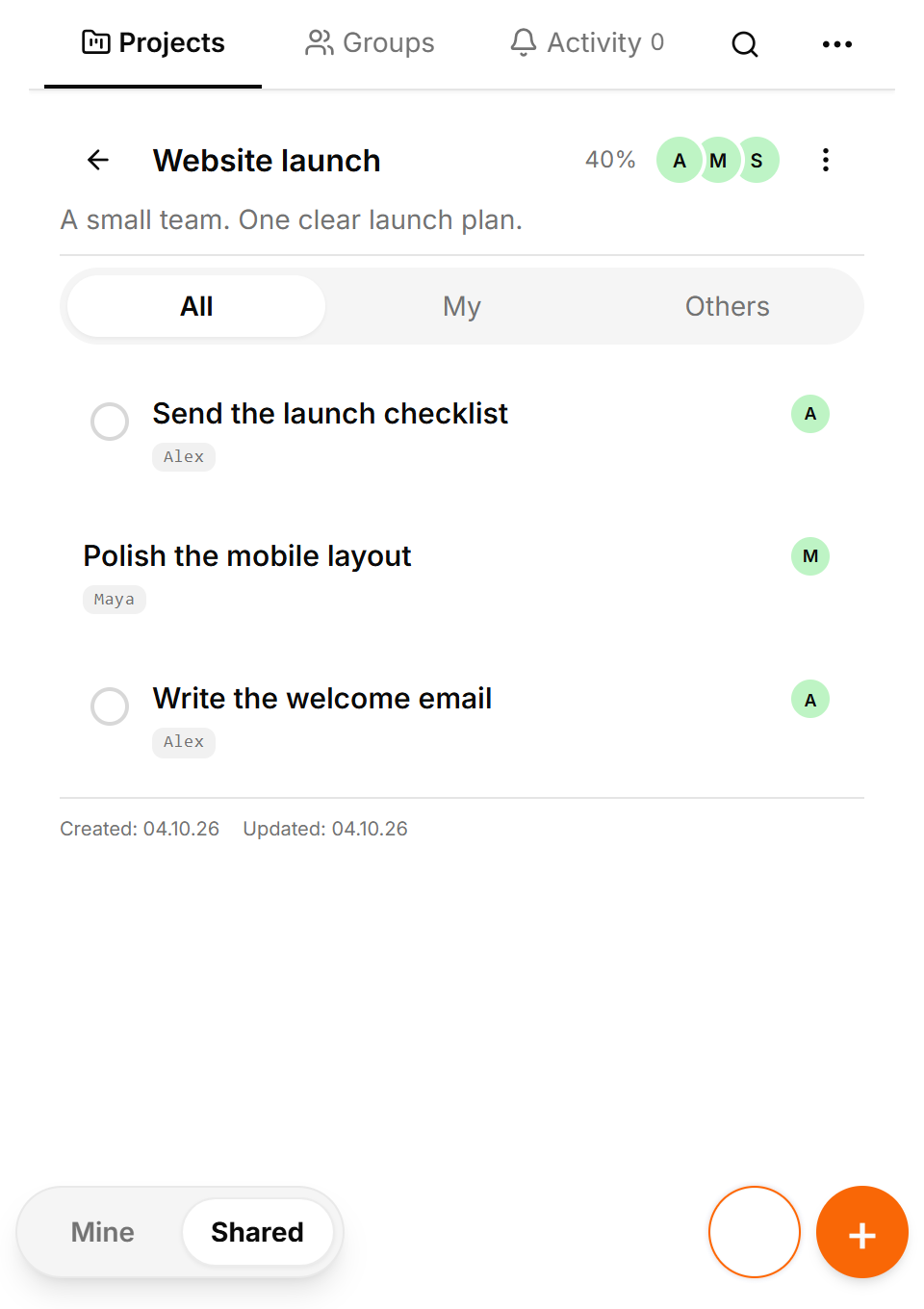
Your team. Your family. Your friends. Share projects, assign tasks and see progress in Telegram — where you already talk.
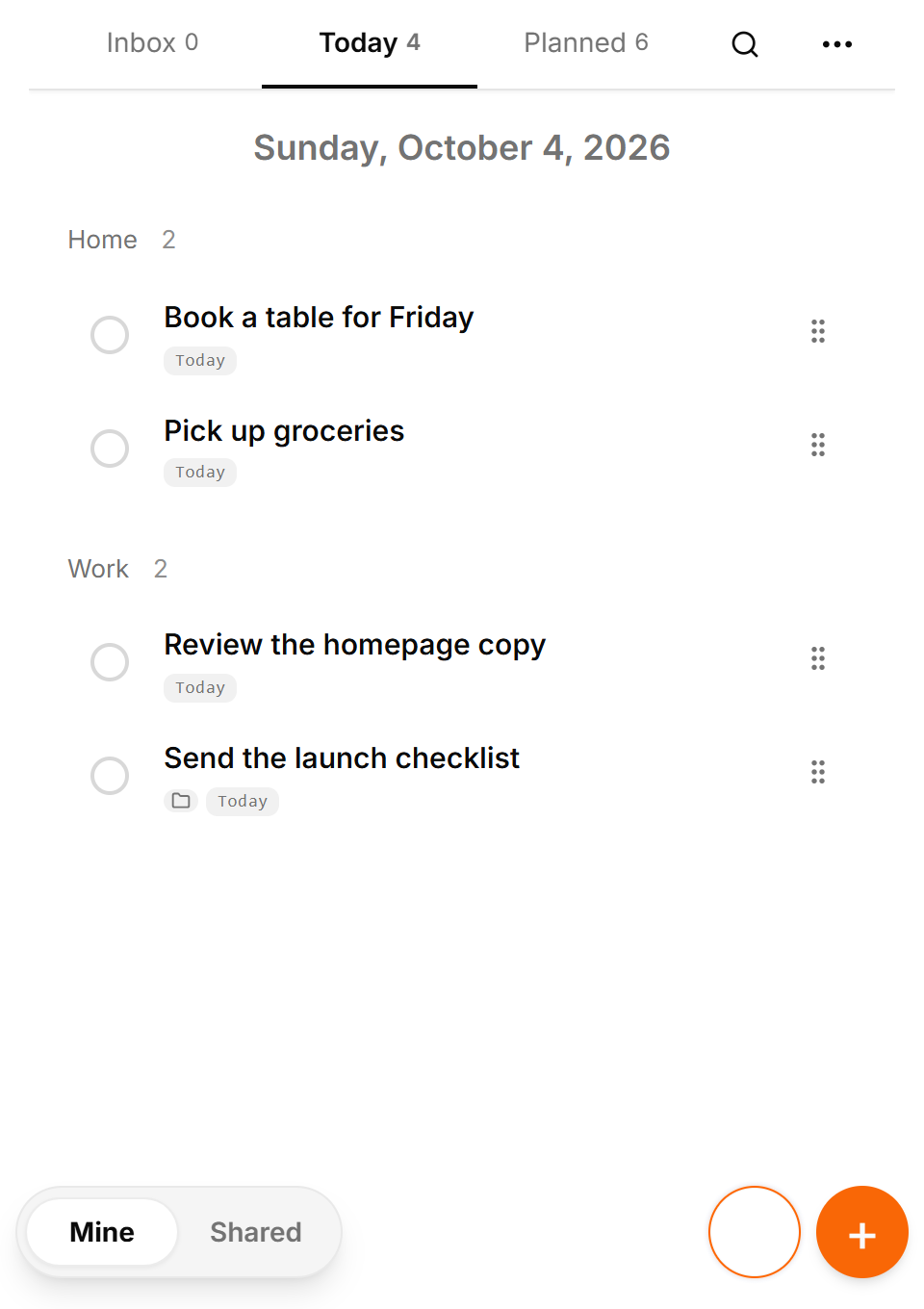
Your personal tasks and the shared work you've taken on. One clear view of your responsibilities.
Shared projects, group tasks and assignments. See who's doing what and how things are moving.
Ask your assistant to review a project and help spot what needs attention or what might be holding it up.
Every participant needs their own Premium to make collaborative changes. Existing collaboration remains readable on Free.
Tap Start in Telegram and open TasksNet.
Write a message, record a voice note or send the bot a photo.
Check the title and date, edit the draft and confirm.
AI prepares an editable draft. You approve the task and its date.
Example voice note
Remind me to send the proposal on Friday at 10:00.
Send the proposal · Friday, 10:00 · review before saving
02 / Find your focus
Less sorting through lists. More time for what deserves your attention.
Get your planning digest in Telegram at your chosen time, with today's tasks and what's coming next.
Smart Deadlines bring eligible tasks into This week, Tomorrow or Today as their deadlines approach.
Ask AI what to focus on, break work into smaller steps or move tasks. Review its suggestions before applying them.
Personal exploration is free. Collaboration requires Premium for every participating account.
0 Stars
every 30 days
Free AI also uses a shared monthly budget and may temporarily be unavailable.
350 Stars
every 30 days
Subscription availability is shown in the app. Recurring payment in Telegram Stars until canceled; the cost of buying Stars varies by country and platform.
Complex AI requests use more credits. Credits do not roll over.
Yes. The service currently works through the Telegram bot and Mini App on devices where Telegram is available. This website explains the product; it does not offer a separate task workspace or independent sign-in. Expansion to other platforms is planned, with no announced release date.
Manage personal tasks, receive reminders and try AI within the Free allowance. The pricing section shows plan limits, and the app shows your remaining allowance. AI requests use credits; complex requests cost more. Free AI also has a shared monthly budget and may temporarily be unavailable. You can still manage tasks manually.
Send a voice note, photo or forwarded message to the bot. AI prepares an editable task draft. Check the title, description, date and reminder before saving: recognition can make mistakes. The microphone inside the assistant window transcribes your request into editable text; it does not send the request automatically.
No. The assistant first shows proposed changes, and you choose which ones to apply. A conversational reply alone does not confirm them. Smart Deadlines is a separate automatic feature: it moves eligible tasks into nearer planning buckets as their deadlines approach, without changing the deadline itself.
Yes: share individual tasks, organize projects and manage Telegram group tasks. These have different membership and acceptance rules. Each participant needs Premium for collaborative changes; existing shared data remains readable on Free within their permissions. AI follows the same access rules and cannot accept an assignment for someone else.
Use Support in the app or the support email in the page footer. Describe the question or problem; never send passwords or sign-in tokens. For payment help, send /paysupport to the bot. You can request a copy or deletion of account data by email; support verifies the request. The Privacy Policy explains processing and retention.
The assistant works with your task context. It can find tasks, summarize your plan or a project, suggest priorities and next steps, and help turn a goal into tasks. It can also prepare a new project or changes to task titles, descriptions, dates, reminders, places and completion status. Supported changes to settings are available too; you review and confirm them.
Try: “What do I have planned for today?”, “Which tasks are overdue?”, “Help me choose priorities”, “What needs attention in this project?”, “Add a checklist to this task” or “Move ‘Send the proposal’ to tomorrow and remind me at 10:00”. Name the task or open it first so the assistant has clearer context.
It uses information you put into the service: tasks, deadlines, reminders, available projects and groups, contacts, comments, activity records, supported settings, completion statistics and the current conversation. This lets it answer about your actual plans without asking you to paste your whole list. Context depends on the request, your permissions and plan. Large lists may be only partially included; AI does not know everything about you.
It processes what you send or forward to the bot, not all your private chats. Group discussion analysis is a separate mode enabled by the group owner: it collects new text and captions received after activation for that day. The collected discussion is sent for AI analysis through /analyze. Earlier group history is not loaded, and proposed tasks still need confirmation.
Check important task details and dates before applying a suggestion. AI can misunderstand a request or receive only part of a large list. Be specific, correct the draft or ask a follow-up question. If credits run out or AI is temporarily unavailable, you can continue creating and editing tasks manually. AI suggestions do not replace your own decisions.
An independent web workspace and sign-in without Telegram are not available yet. These, along with integrations with other task managers and messengers, are planned; dates and supported services have not been announced. Google Calendar sync is already available: it exports tasks and can import events from calendars created by this app. It does not read your other Google calendars.
You can change existing options such as language, theme, timezone, daily digest and Calendar sync in Settings. There is no direct constructor for custom task places or arbitrary new settings. Contact support with the place or option you need; we will explain what can be configured now.
Tasks, projects and settings are stored in the service database on a separate server, rather than only in Telegram chat history. Telegram is currently used to identify your account, open the Mini App and deliver notifications. Separate storage does not yet mean you can sign in independently of Telegram.
The current sign-in is linked to your Telegram account. A new Telegram account does not automatically gain access to the old account’s tasks. Contact support to discuss the situation and whether access can be restored after ownership checks. An automatic recovery or transfer process is not currently available, so recovery cannot be guaranteed.
Other users cannot access your personal tasks through the app. Shared tasks are visible only within the applicable collaboration permissions. Connections use HTTPS. Sign-in tokens stay in app memory rather than browser local or session storage; the server stores credential hashes and rotates refresh tokens. Stored Google Calendar tokens are encrypted. Technical logs exclude task and message content. You can sign out of the current session or all devices.
Yes. To provide AI features, your request and information from the service used for the response are sent to an external AI provider; voice or image recognition also sends the media you choose. This processing is separate from storing tasks on our server. Provider use and retention are governed by the provider’s applicable terms. Details of data sharing are in our Privacy Policy.
The Privacy Policy explains who operates the service, what data is processed, which providers receive it and how to request a copy or deletion. Contact the support email for these requests; ownership is verified first. Deleting a task can initially be a soft deletion, and backups may retain earlier copies for up to 28 days.
Manage tasks and projects inside Telegram. Turn messages, voice notes and photos into editable AI task drafts. Plan, collaborate and get reminders.
Read the guideDictate a task in Telegram, clarify it with AI and hand it to a colleague. See acceptance, comments and result review in TasksNet.
Read the guideCreate tasks in a Telegram group, build a project for three people, assign work and follow progress. A TasksNet guide with real interface screenshots.
Read the guideConnect Telegram reminders to saved TasksNet tasks. Set a useful time, review your timezone and use a daily digest to return to the wider plan.
Read the guideForward an important request to TasksNet, review its draft and choose when to act. Follow the path from a Telegram message to your daily task list.
Read the guideUse a photo or screenshot to prepare a task in Telegram. Review extracted text, dates and private details before confirming a TasksNet draft.
Read the guideDiscuss a project, review a checklist or reschedule tasks with TasksNet AI. Smart Deadlines and opt-in group analysis help you keep actions in view.
Read the guideExtract five tasks from a Telegram discussion, clarify one with AI and plan the work. A TasksNet walkthrough with screenshots and video.
Read the guideKeep tickets, accommodation and the route in one TasksNet project. Assign actions, confirm responsibility and discuss each task in its comments.
Read the guideFind a contact's shared work, invite people to separate projects and keep responsibility clear without exposing private task lists.
Read the guideUse TasksNet Activity to review recent changes and comments, open their exact task context and keep later updates unread.
Read the guideApply Getting Things Done principles in TasksNet: capture in Inbox, clarify next actions, focus in Mine and coordinate projects in Shared.
Read the guide